
Gradient Text
Deltarune has gradient text because of GameMaker's draw_text_colour function. This function lets each "corner" of the text have a different color, thus letting you do a gradient. Unfortunately, Godot doesn't have a similar function, so we had to write one by ourselves. Drawing gradient text isn't actually as hard as it looks, since it just depends on principles in graphics.
Vertices
In many different graphics pipelines, including Godot's, anything (2D or 3D) is drawn with triangles, which each consist of three vertices. A vertex has lots of information. It has the position of the vertex on the screen, but it also has the "color" of the vertex, and its "texture coordinate". A vertex's color determines the color at that vertex. However, at any point between the three vertices of a triangle, that point's color is a mix of all three vertex's colors, so it is a GRADIENT. A triangle can be drawn with a texture (an image). This is how sprites and text are drawn in 2D games, with triangles that are given textures. A texture coordinate determines what part of a texture should be drawn at the specific vertex. 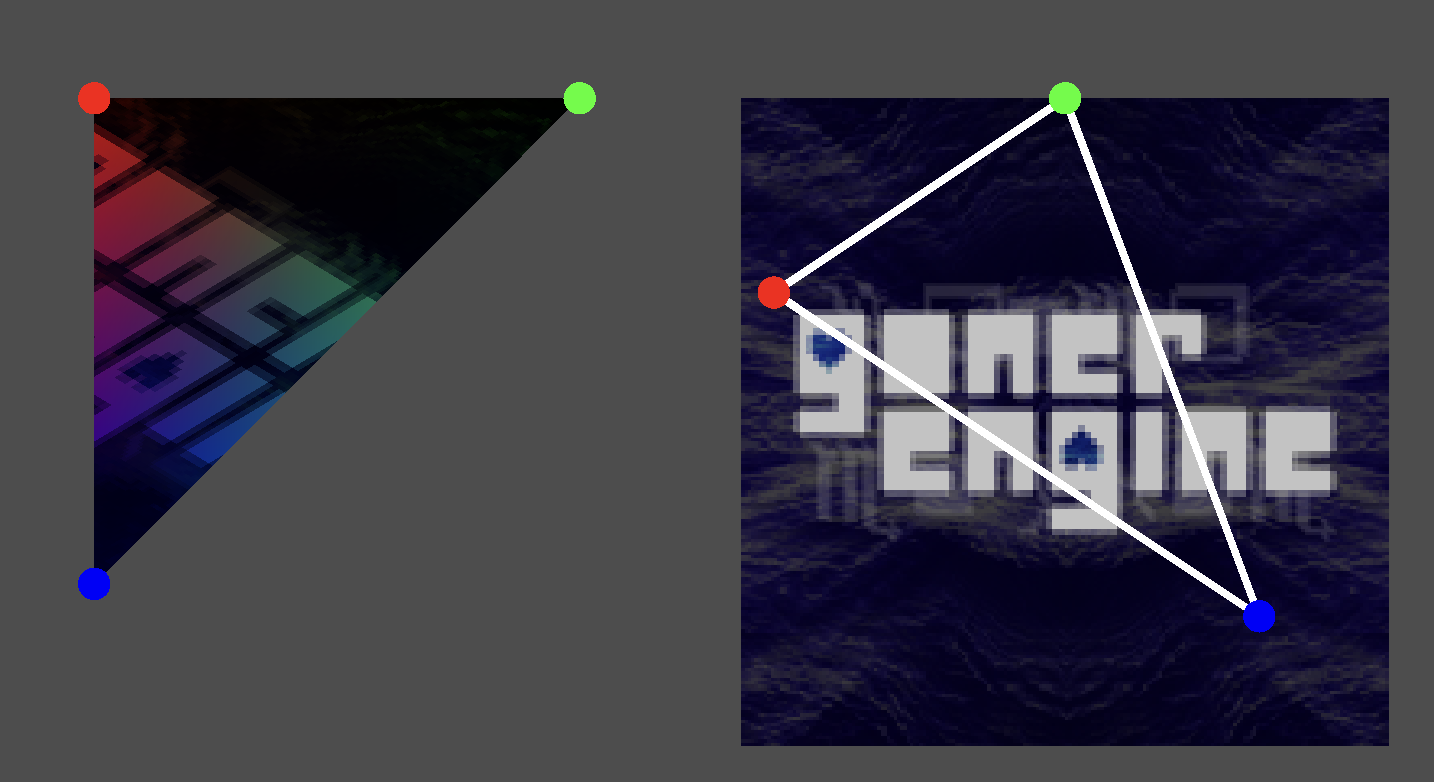
In Godot (as well as many other engines and frameworks), fonts are stored in an "atlas", which is a texture containing all of the characters in the font. To draw a single character, we need to draw a rectangle, which is two triangles. These two triangles must have the correct texture coordinates so that they only show the portion of the texture corresponding to the texture we want to draw.
This all might seem a bit daunting, but it is how nearly EVERYTHING in a 2D or 3D game is drawn! Everything, including meshes, sprites, and text, are broken into little triangles with textures, texture coordinates, and colors. This is all incredibly fast for a GPU to do.
So, how do we do it in Godot?
RenderingServer
See the Rendering Server page for more information.
TextServer
TextServer is a low-level API that Font uses to draw text in Godot. Here, we need to use it directly, in order to get the texture of the font. In TextServer, a font size is represented as a Vector2i. The X component is the actual font size, and the Y component is the size of the font's border. Since we don't want the font to have a border, our font size will be Vector2i(font_size, 0).
We need a font RID in order to use TextServer, which we can get from a Font object with font.get_rids()[0]. Note that the font.get_rid() method DOES NOT WORK and will return and invalid RID. font.get_rids() returns an RID array, with the 0th element being the actual fonts, and later elements being fallback fonts, but here we will assume that fallback fonts are not needed.
TextServer functions deal with characters as "codes", integers that represent those characters. You can get a character's Unicode code with ord(character). For example, ord("A") is the integer 65.
To use TextServer, we need to get its instance with TextServerManager.get_primary_interface(). We'll call the instance returned by this method ts. Then, we need to get the "glyph index" of the character we want to draw, which we use the method ts.font_get_glyph_index(font_rid, font_size, char_code, 0). (The last parameter is some "variation" thing I don't fully understand.) Then, to get different things about the glyph, such as its offset from the baseline, texture, region in the texture, and size of the texture, use the ts.font_get_glyph_PROPERTYNAME(font_rid, font_size_vec, glyph) functions.